


Thank you for always using Myterry.
We have made the following updates in version 1.3.0:
“Offline Marking” Feature
This feature allows you to perform marking even when there is no network coverage or when your connection is lost during a Myterry activity.
Previously, if you were in an area without network coverage, marking could not be completed due to communication errors, preventing the activity from being finished. With this new feature, you can freely perform marking even inside buildings without signal, in forested areas, or in coastal regions where network access is limited.
At this time, this feature is available to all users.
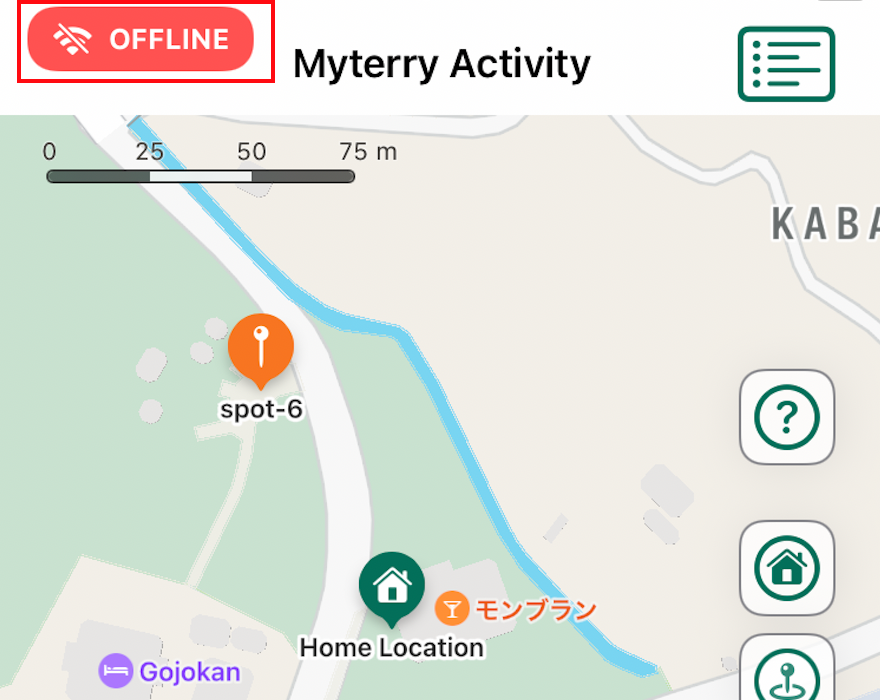
When you are offline, an “OFFLINE” icon will appear in the upper-left corner of the activity screen. You can continue marking while this icon is displayed.
Important Notes When Using Offline Marking
- When starting a Myterry activity, the app must retrieve activity-related information. Therefore, you need to begin the activity while online.
- Information marked while offline (including latitude, longitude, and timestamp at the time of operation) will be recorded and stored within the app. Once you are back online, the data collected during offline mode will be transmitted to the system and synchronized between the system and the app.
- While offline, you cannot switch Myterry activities, browse other Myterry information, or view activity history.
- If you finish an activity while offline, the completion information will be stored within the app. Once you are back online, the information will be transmitted to the system, and the completion status will be determined at that time.
- Please ensure that images taken during offline marking do not include prohibited content (for example, people). If prohibited content is detected in images taken while offline, the information will be transmitted and verified once you are back online (either during the activity or upon completion), and the marking may be rejected.
- In such cases, any markings taken after the rejected one will also be canceled. As a result, even if you ended the activity offline, it may not be considered completed, and you may need to restart from the rejected marking.
Other Updates
- Minor improvements that do not affect feature operations.
If you have any questions, please contact us via the inquiry form at the provided link.
We appreciate your continued support of Myterry!